
Halifax, NS, Canada — PanoVolo, a leader in panorama photo stitching software, today announced the release of version 1.13.0, now available for both Windows and macOS. This release introduces the ability to stitch panoramas in PanoVolo directly from Lightroom Classic, a new high resolution 3D panorama viewer, wide color gamut support, and more.

Lightroom Classic Export Plugin: The new optional export plugin lets users send selected images directly from Lightroom Classic to PanoVolo for stitching. Select images in Lightroom Classic’s Library grid, then choose File > Export > PanoVolo > Create Panorama to export them in DNG format and automatically start stitching in PanoVolo.
High Resolution Panosphere Viewer: The interactive spherical panorama viewer (View > 3D Sphere) has been completely rewritten and now supports four times the resolution, up to 32K pixels horizontally. The new viewer also eliminates small visual artifacts that appeared near the poles in the previous version.
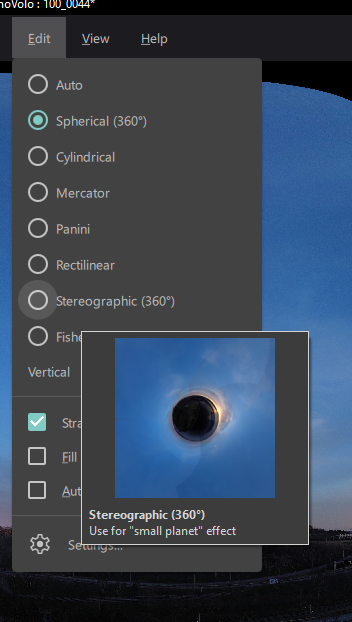
Automatic Panorama Projection: PanoVolo can now analyze panorama image layout and automatically select the best projection – “Cylindrical” for horizontal 180° panoramas, “Rectilinear” for wide angle 3×3 panoramas, and “Vertical Cylindrical” for vertical panoramas. For all other cases, “Spherical” projection is used. Automatic projection selection also works in the batch mode. This release also adds a “Fisheye” projection and thumbnail previews showing how the panorama will look in each projection.
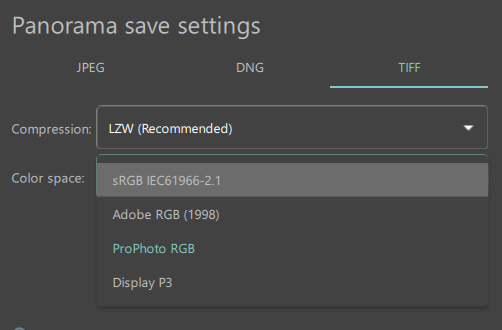
Color Space Selection for TIFFs: TIFF files can now be exported with a specific color gamut – sRGB, Adobe RGB, ProPhoto or Display P3. When stitching from DNG files, PanoVolo now processes images internally in the linear ProPhoto RGB color space to preserve as much color information as possible.
Full list of changes in this release:
- Added Lightroom Classic export plugin. Allows for automatic export and stitching of DNG files selected in the Lightroom library grid.
- The resolution of the spherical panorama viewer was increased 4x to the maximum of 32k pixels (horizontally) and with a better quality of the panorama display.
- Automatic panorama projection selector (View > Auto) picks the best projection based on the panorama image layout.
- Added “Fisheye” panorama projection – similar to the “Stereographic” (“little planet”) but with the sky in the center.
- Preview of the panorama projections – a small thumbnail image is generated for each projection.
- Added the ability to select the destination color space (and save ICC profile) when saving panoramas in TIFF format.
- When stitching from DNG files, internal processing is now done in the linear ProPhoto RGB color space for extra-wide color gamut support.
- Fixed the problem with overexposed Avata 360 DNGs. The information is recovered from the files saved by the drone with incorrect parameters. Many thanks to Luca Navarrini for finding the root cause.
- Improved image alignment and camera focal length optimization.
- Reduced memory consumption when converting panorama color spaces and preparing panoramas for display.
- Added GPANO metadata to 360° cylindrical panoramas.
For more information and to explore these new features, please visit the PanoVolo website.
About PanoVolo
PanoVolo is trusted by panorama content creators worldwide and is committed to delivering state of the art panorama stitching solutions. This update is available as a free upgrade for all existing macOS and Windows users.
Press Contact
support@panovolo.com
https://www.panovolo.com
Panovolo is a registered trademark of Panovolo.com. All other trademarks mentioned herein are the property of their respective owners.